MisteR Dashboard
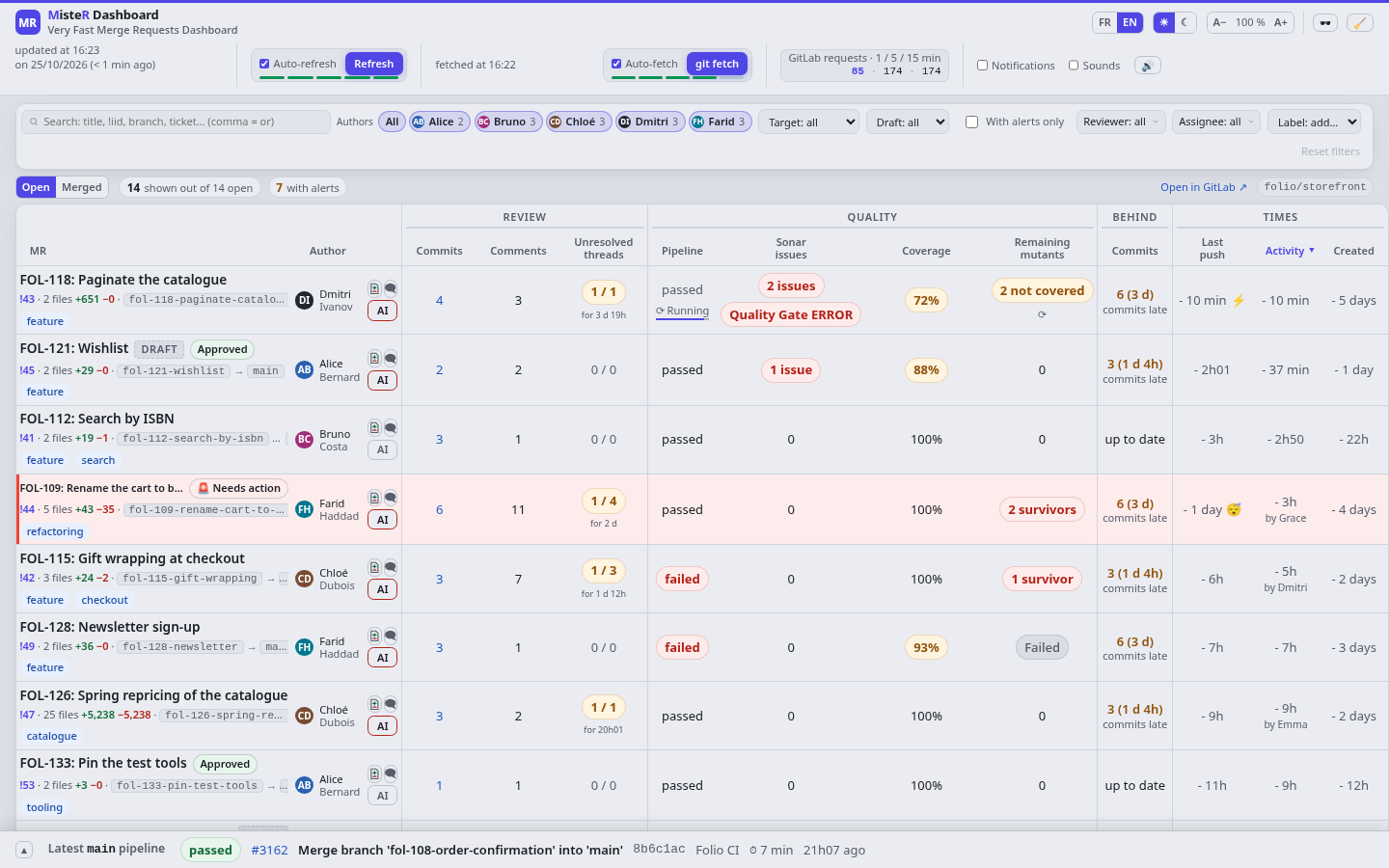
A dashboard of the open merge requests of a GitLab project, on one page. Each one shows what it waits for: pipeline, SonarQube, mutation testing, unresolved threads, lag behind the target branch, so you see at a glance which one needs you. On top of that, it brings features that GitLab's merge request list lacks.
Features
What GitLab's merge request list doesn't do
- See which merge request is worth your review now: for each one, whether it builds, its Sonar quality gate and mutation testing score, how many commits and how recent the last push, who pushed or commented last, the unresolved threads and the lag behind the target branch. Red build, no need to look yet; green with a few commits, time to review.
- A diff that reads better, small or large: the words that changed marked within each line, the file list always beside the code, side by side or line by line, and large diffs that stay smooth, each file highlighted as it comes into view, Space + drag to read a long line.
- The review's rhythm, in one chart: hover the commit count to see the commits pile up over time, with the reviewers' comments and the author's answers placed on the curve. Do reviews follow the pushes quickly? Do fixes follow the comments? It shows at a glance.
- Review only what changed: the diff groups commits by push, and shows the last push alone or only what arrived since you last read it.
- Notified when it matters: a browser notification when your merge request breaks or gets approved, or when the main branch's pipeline fails, with a sound for each: a bell for an approval, a siren for a failed main branch, an arpeggio for a merge.
- AI prompts for a merge request: one button writes the prompt that fixes what is red, from the CI signals and the unresolved threads, or runs the actions your project defines, such as a review. Copy it into your coding agent, or launch it in a new tab of Orca, herdr or your terminal: GNOME Terminal, Terminator, xterm, tmux and others.
- Lead time, merge request by merge request: look back at what was merged, with the same review indicators as the open ones, commits, comments, threads and the review's chart, plus how long each took to develop, to stabilize and in total.
- Diffs that survive a GitLab outage: each diff is computed on your local git clone, kept fetched in the background.
- No login page, no SSO redirects: the dashboard reaches GitLab with your token, so it is there as soon as the tab opens, even when the browser restores yesterday's tabs.
- Search across merge requests: every word must match, a comma separates alternatives,
!249targets one merge request.
And everything you already use in GitLab
- Approvals, labels, draft status and the target branch of each merge request.
- The diff, side by side or line by line, with syntax highlighting.
- Line comments: publish a discussion, reply, resolve or reopen a thread.
- The merge request's comments and reviews, rendered as in GitLab.
- Files ticked as viewed, and the review's progress.
- The latest pipeline of the main branch, its jobs by stage.
- Light and dark themes, in English or French.
Try it without a GitLab
The demo comes with its own fake GitLab and SonarQube and an invented project, an online bookshop, so you can try everything without a server, a token or any configuration.
git clone https://github.com/YannRobert/mr-dashboard.git
cd mr-dashboard
python3 demo/run.py
Fourteen open merge requests, with their pipelines, review threads and a real git repository for the diffs. The team keeps working while it runs: approvals come in, the main branch breaks and recovers, a merge request gets merged. A page of the fake GitLab breaks it on demand, to see the dashboard through an outage.
Start it
You need git, a local git clone of the project to track, and a GitLab token from the glab configuration (glab auth login once).
git clone https://github.com/YannRobert/mr-dashboard.git
cd mr-dashboard
python3 mr_dashboard/server.py \
    --gitlab-host https://gitlab.example.com \
    --gitlab-project group/project \
    --pipeline-branch main \
    --repo-dir ~/src/project \
    --no-sonar --no-pit
Then open http://localhost:8765/. With SonarQube or mutation testing, the options name the server and the CI jobs; start.sh keeps the dashboard running all day from a profile.
How it works
A very small server runs on your machine. It serves the page, relays the GitLab and SonarQube APIs, and keeps the local git clone fetched. It refreshes the merge requests every 5 minutes, and a reload redisplays what the browser already has without asking GitLab again.
- Fewer GitLab requests: reads are cached for 30 seconds and shared by all your tabs. A counter shows the load put on GitLab over the last 1, 5 and 15 minutes.
- When GitLab is unreachable, each merge request keeps its last known signals, marked as stale, and the commit counts come from the local git clone.
- Nothing to install but Python 3 and git: no dependency, no framework, no build, no administrator rights.
The README gives the exact requirements.
Security
- The local server listens on
127.0.0.1only and requires aHostoflocalhostor127.0.0.1, so that a web page cannot reach it through DNS rebinding. - The GitLab and SonarQube tokens stay in the local server. The browser never sees them and never talks to GitLab or SonarQube directly.
- Only reads are relayed. The only writes to GitLab are a line discussion, a reply, and resolving or reopening a thread, each validated before being forwarded.
- Local actions require a dedicated header and an
Originof the dashboard itself. - Comments are rendered from GitLab's HTML after removing anything that could execute in the page.
The full security model is in the README; vulnerabilities are reported privately, as SECURITY.md explains.
Current limits
- One dashboard tracks one GitLab project. For several projects, start one per project, each on its own port.
- The mutation testing score is read from a note that a CI job of your project posts on the merge request, in the documented format.
- A launched prompt starts Claude Code, in the one place chosen when the dashboard starts; Orca when nothing is chosen and Orca is found.
- Merging, approving and editing a merge request happen in GitLab, one click away.